PowerPivot provides a host of great functions like DATESYTD, DATESMTD, DATESBETWEEN, etc. that are useful for calculating many things, including a running total.
But with the exception of DATESBETWEEN, I seldom get to use any of those “time intelligence” functions, for the simple reason that our clients almost never operate on a traditional calendar.
I very often find myself working with a “calendar” that looks like this:
Can’t Use Time Intelligence Functions With a Calendar Like This
And sometimes I even find myself with “calendars” that don’t have any date columns in them at all:
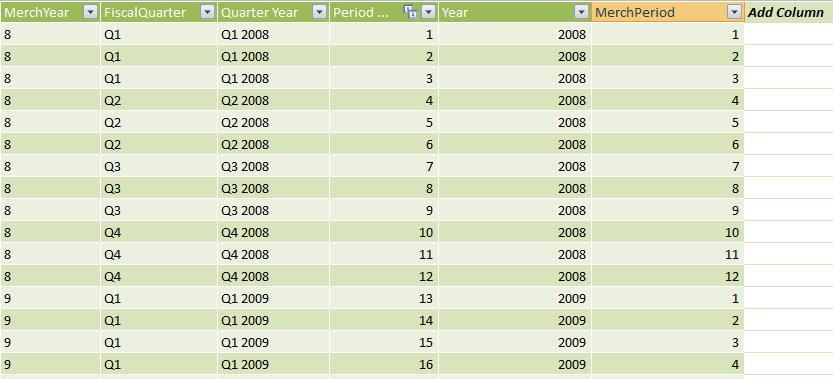
This Table DOES Truly Represent the Business Calendar But Has No Dates in It!
So what do you do when you still need a “Year to Date” Total?
Silly humans. They don’t care that the data is structured one way or another under the hood. They just keep insisting on seeing useful things, like Year to Date totals. They don’t want to hear how the blender is constructed, they just want their daiquiri.
So, what’s a report designer to do? Give up? No way. We make daiquiris anyway.
I’m going to use that second calendar above, the one that has no dates in it. In fact this is the same data set I have been using for the Precedence Project. (Really, this is Part Three in disguise). So let’s return to a familiar pivot:
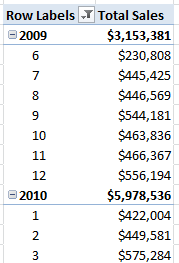
Familiar Starting Point
It has Year and MonthNum on rows, and the simple measure Total Sales. I want to end up with this:
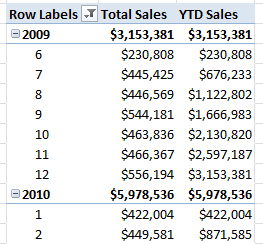
Desired Result
Getting to that desired result, in my experience, is something you either stumble upon quickly or flail around forever and never find. In fact, finding myself in a situation like this is what triggered me to start the Precedence Project in the first place.
Cutting to the chase: this formula works
To keep this post short and sweet, I’m just going to share a working formula. I hesitate to call it “the” formula, because there are multiple variations that work, and some fit certain biz requirements better than others.
So here is one that works. It has some quirks that I will iron out in the next post.
[YTD Sales]=
[Total Sales](
FILTER(
ALL(Periods),
Periods[PeriodNum]<=MAX(Periods[PeriodNum])
),
VALUES(Periods[Year])
)
In short, this measure clears all filters on the entire Periods table, then adds back two filters – restores the current context for Year (using VALUES), and limits the PeriodNum to be less than or equal to the current context (I will explain later why I used MAX and not just VALUES). Note that I am using PeriodNum (which keeps increasing across years and is unique to a given Month/Year combo), not MonthNum (which is on the pivot and “resets” to 1 for January of each year).
Next Post: Explaining the Formula, and Showing How NOT to do it
Explaining that relatively simple formula, if I do a thorough job, will consume its own post. And I also want to cover some other approaches – ones that seem like they should work but do not. Because the things that DON’T work are even more educational than the things that do.
The only time I want to hear about blender construction is when the Blendtec guy is explaining it. Otherwise, the dacquiri wins every time
Thanks for the post Rob. I’m very interested in seeing your future posts on this topic also. Working with a 4-5-4 calendar has been a challenge ever since I started working with PowerPivot. I created a day level YTD function for my fiscal calendar using your pattern. [Sales YTD]=[Sales](FILTER(ALL(Date),’Date’[DayOfYearNum]<=MAX('Date'[DayOfYearNum])),VALUES('Date'[Year])). It also works well for month and year rollups. Cool!
Recently I have been modeling attributes within my Fiscal Calendar dimension that are normally provided by DAX time intelligence functions (for regular calendars). For example, STARTOFYEAR as a column so I could use DAX like this: [YTD]=[Sales](DATESBETWEEN('Date'[Date], MIN('Date'[StartOfYearDate]),LASTDATE( 'Date'[Date])), All('Date')).
Something that is a challenge with the current release of PowerPivot is the lack of MDX functions like PrevMember or DAX's ParallelPeriod (which only works on a regular calendar) which means that I have to resort to math on keys (like subtracting 1 from the YearNum to determine the prior year for YearAgo calcs).
Any plans on sharing a YAgo YTD variation of this calculation that would in turn provide the basis for simple [Year-over-Year Difference] and [Year-over-Year Percent Change] calculations? I appreciate you sharing these tips. Please keep them coming! Thanks!
Hi Luke. Yes, from what I have seen, the MAJORITY of real-world PowerPivot usage runs into custom calendars almost immediately, and the time intel functions go out the window. It would make sense for them to someday add another set of functions that work against things like PeriodNum.
The trick you are using today with the extra columns like STARTOFYEAR is also one we use a lot. Have you tried extending that with other columns like STARTOFPREVYEAR and EQUIVALENTDATEPREVYEAR? Because I think that absolutely can yield your desired year-over-year comparison. We do that all the time.
Hi Rob. Appreciate your ideas. Interestingly enough, your suggestion is exactly what I do for the prior year YTD calculation. It seems like a lot of steps but I built a calculated column that combines the Year and DayOfYear:
[YearDayID]=([YearNum]*1000)+[DayOfYearNum] in the format 2011001
then another to get the Prior Year
[PriorYearNum]=’Date’[YearNum]-1 (2011 becomes 2010)
then another to get the equivalant YAgoYearDayID (2011021 will return 2010021)
[YAgoYearDayID]=CALCULATE(MIN(‘Date’[YearDayID]),’Date’,'Date’[YearNum]=Earlier(‘Date’[PriorYearNum]),’Date’[DayOfYearNum]=Earlier(‘Date’[DayOfYearNum]))
Then I do a lookup to get the equivalant YAgoDate in a date format for use with the DATESBETWEEN function:
[YAgoDate]=CALCULATE(FirstDate(‘Date’[Date]),’Date’,'Date’[YearDayID]=EARLIER(‘Date’[YAgoYearDayID]))
The reason I use lookup calculations instead of simple subtraction is for situations like 53 week years and non-existent prior years. My original question was more to see if you had a magic DAX measure for YTD YAgo that uses the current year and PeriodNum of a custom calendar. I was hoping to possibly simplify these steps because that is exactly what this post did for my current YTD calculation. Look forward to your future posts.
Nice post Rob
Luke, if you want to make math over previous year, you need to detect which days belong to the same period in the previous year and this can be done if you change some values. Instead of using the PeriodNum (which is always inreasing), you need to use the DayOfTheYear value. Rob’s formula can be easily adapted to work using a DayOfTheYear column like this:
YTD =IF (
COUNTROWS (VALUES (‘Date’[Year])) = 1,
CALCULATE (
SUM (‘Date’[Value]),
FILTER (
ALL (‘Date’),
‘Date’[Year] = VALUES (‘Date’[Year]) &&
‘Date’[DayOfYear] <= MAX ('Date'[DayOfYear])
)
)
)
The logic of this formula is EXACTLY identical to Rob's one (and I think understanding this simple statement is a good exercise in DAX). By simply changing the condition on the year column, you can get the YTDPY formula:
YTDPY =IF (
COUNTROWS (VALUES ('Date'[Year])) = 1,
CALCULATE (
SUM ('Date'[Value]),
FILTER (
ALL ('Date'),
'Date'[Year] = VALUES ('Date'[Year]) – 1 &&
'Date'[DayOfYear] <= MAX ('Date'[DayOfYear])
)
)
)
Please note the initial check for COUNTROWS (VALUES()), which is needed to perform math over VALUES().
Moreover, it is imporrant to not that this formula compute the same number of days in the previous year, which, at the month level, can be a wrong value. Nevertheless, by leveraging this simple approach, you can build any filter on the calendar table and get the desired result.
Alberto, thank you for your insights! Your mods to Rob’s formula work well. I will study them. Appreciate your explanation and word of caution on months. Our 4-5-4 calendar helps make sure we are summing the same number of days at the month level most of the time
Cheers!
Hi
How do I create a running total in the Powerpivot environment (with CalculatedColumn)?
Thanks
Tom